
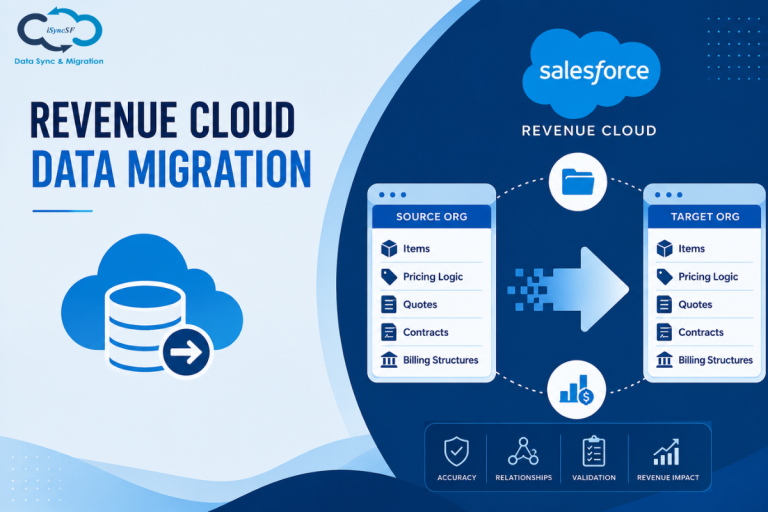
Revenue Cloud data migration differs from a typical Salesforce data transfer. You’re not merely moving documents. Revenue is directly impacted by the items, pricing logic, quotes, contracts, and billing structures you are transferring.
For administrators, this means that relationships and accuracy are more important than volume.
Particularly for org-to-org scenarios, this book guides you through the planning, execution, and validation of a Salesforce Revenue Cloud data migration.
What Is Revenue Cloud Data Migration?
Moving all revenue-related data between Salesforce organisations is referred to as revenue cloud data migration. This includes:
- Price books and product catalogues
- Configurations of CPQ (bundles, options, rules)
- Line items and quotes
- Subscriptions and contracts
- Data on billing and invoicing
This involves highly connected and logic-driven data, in contrast to straightforward data movement.
Why Revenue Cloud Migration Is More Complex
Several tiers of connections and dependencies form the foundation of Revenue Cloud. A minor mistake can affect billing accuracy or disrupt pricing rationale.
Typical difficulties include:
- intricate relationships between items and pricing guidelines
- Custom objects and managed package components are used extensively.
- Large amounts of data in subscriptions and quotes
- Continuing the quote to ensure contract continuity
- After migration, ensuring billing accuracy
For this reason, a methodical and tried-and-true methodology is essential.
Key Components You Need to Migrate
Before starting, you should clearly identify what needs to be moved.
Product and Pricing Data
This includes products, price books, pricing rules, discount schedules, and product bundles. Any mismatch here can lead to incorrect quotes.
CPQ Configuration
Revenue Cloud relies heavily on CPQ logic such as configuration rules, product options, and constraints. These must be migrated accurately.
Transactional Data
Quotes, quote lines, contracts, and subscriptions are core revenue records. They need to maintain their relationships.
Billing Data
If you are using billing features, invoices, payments, and tax structures must also be considered.
Common Mistakes Admins Make
Even experienced admins run into issues during Revenue Cloud migration.
- Migrating data without understanding dependencies
- Ignoring the sequence of object migration
- Breaking relationships between quotes and products
- Not testing pricing and discount logic
- Skipping sandbox validation
These mistakes often lead to incorrect pricing, failed automation, and reporting issues.
Step-by-Step Revenue Cloud Migration Process
A structured approach reduces risk and ensures accuracy.
1. Assess Your Current Org
Start by analyzing your existing setup. Identify customizations, dependencies, and data volume.
2. Define Migration Scope
Decide what data is required. Avoid migrating unnecessary historical data unless needed.
3. Prepare and Clean Data
Remove duplicates, fix inconsistencies, and standardize fields before migration.
4. Map Objects and Relationships
Revenue Cloud data is highly connected. Ensure proper mapping between:
- Products and price books
- Quotes and quote lines
- Contracts and subscriptions
- Billing and payment data
5. Maintain Migration Sequence
Order matters in Revenue Cloud migration.
Typical sequence:
- Products and price books
- CPQ configuration
- Quotes and quote lines
- Contracts and subscriptions
- Billing data
Following the correct sequence ensures relationships are preserved.
6. Perform Sandbox Testing
Always test migration in a sandbox environment.
- Validate pricing logic
- Test product configurations
- Check quote generation
- Verify contract and billing workflows
7. Execute Production Migration
Once testing is successful, proceed with production migration in a controlled manner.
For complex setups, using a native tool like iSyncSF ensures that data is transferred directly between Salesforce orgs while maintaining structure and relationships.
8. Post-Migration Validation
After migration, verify:
- Record counts
- Pricing accuracy
- Quote and contract continuity
- Billing outputs
Why Data Relationships Matter in Revenue Cloud
Revenue Cloud depends heavily on relationships. For example:
- A quote is linked to products and pricing rules
- A contract is linked to subscriptions and billing
- Pricing depends on multiple rule layers
If these relationships are not maintained, your entire revenue process can break.
Role of iSyncSF in Revenue Cloud Migration
Handling Revenue Cloud migration manually is difficult due to complexity and scale.
iSyncSF helps by providing a Salesforce-native, Org-to-Org data migration approach.
It supports:
- Direct Salesforce-to-Salesforce data transfer
- Preservation of complex relationships
- Handling of large CPQ and billing datasets
- Structured and trackable migration process
Since it works within Salesforce, it reduces dependency on external tools and helps maintain data integrity.
Best Practices for Revenue Cloud Migration
To ensure a smooth migration:
- Start with a small dataset before full migration
- Involve both admins and business users
- Document configurations and dependencies
- Validate pricing and billing logic thoroughly
- Avoid last-minute structural changes
These practices help reduce risks and improve accuracy.
Frequently Asked Questions
Is Revenue Cloud migration different from standard Salesforce migration?
Yes. It involves complex pricing logic, CPQ configurations, and billing data, which require careful handling.
Can I migrate CPQ data using CSV files?
It is possible for small datasets, but not recommended for complex configurations due to relationship dependencies.
What is the biggest risk in Revenue Cloud migration?
Breaking relationships between products, pricing rules, and transactional data.
How do I test Revenue Cloud migration?
Use a sandbox environment to validate pricing, quoting, contracts, and billing workflows.
Do I need a specialized tool for this?
For complex org-to-org migrations, using a structured solution significantly reduces risk and effort.
Final Thoughts
Revenue Cloud migration is not just about moving data. It is about preserving the entire revenue system of your business.
A structured approach, proper testing, and maintaining relationships are key to success.
Ready to Simplify Your Revenue Cloud Migration?
If you are planning a Salesforce Revenue Cloud migration, choosing the right approach from the beginning can save time and prevent costly issues.
Using a Salesforce-native solution like iSyncSF helps you move data securely, maintain structure, and ensure your revenue operations continue without disruption.