Migrating Deep Parent-Child Hierarchies Between Salesforce Orgs
By the iSyncSF team5 min read
Moving a flat list of records between Salesforce orgs is easy. Moving a real data model is not. Accounts have contacts and opportunities, opportunities have quotes, quotes have quote lines that point at products, and custom objects hang off all of them. When those records arrive in a new org, every relationship has to arrive with them. This guide explains why hierarchies are the hard part of an org to org migration, what a manual approach costs, and how a dependency-aware, native approach handles it.
Why hierarchies break migrations
The core problem is record IDs. Salesforce gives every record a new ID when it is created in the target org. A contact that pointed at account 0015g00000ABC in the source org has to point at that account's new ID in the target org, and so does every opportunity, case and custom record that referenced it.
That creates two rules every migration has to follow:
- Parents before children. A record can only be linked to a parent that already exists in the target org.
- Every lookup re-linked. Each reference has to be translated from the old ID to the new one, level by level.
With two objects this is manageable. With ten objects, several levels deep, plus managed package objects, it becomes the part of the project that takes the longest and fails most often.
The relationships you need to plan for
- Master-detail and lookup relationships between standard and custom objects.
- Junction objects that connect two parents in a many-to-many relationship.
- Self-lookups, such as account hierarchies, which can go N levels deep.
- Text relationships, where a record ID is stored in a text field rather than a lookup.
- Managed package objects, such as Salesforce CPQ, which add their own deep hierarchies.
- Files and attachments, which belong to their parent record and must stay with it.
The manual way, and what it costs
Without a dependency-aware tool, a hierarchy migration usually looks like this:
- Export each object to a spreadsheet, one by one.
- Import the file into the target org.
- Export again to get the new record IDs.
- Rebuild lookups with VLOOKUPs for the next object.
- Repeat for every object, then fix the errors.
Every pass is a chance to miss a dependency, and a missed dependency means orphaned lookup, master-detail or junction records in the new org. Files exported separately lose the record they belong to. And at the end, the spreadsheets cannot tell you which records moved, which failed or why.
A dependency-aware approach
iSyncSF is a 100% native Salesforce app that runs inside your own orgs. Instead of spreadsheets, a migration is a template with three steps: choose the source and target orgs, pick the records with a query, and run it. iSyncSF handles the hierarchy:
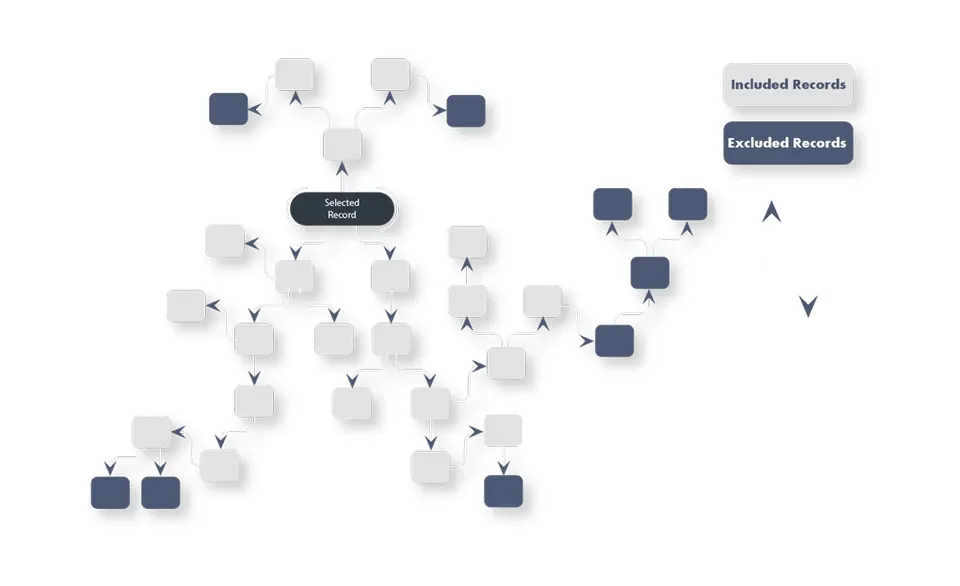
- It finds the related records. Select a parent record and iSyncSF follows its parents and children, including only what is related.
- It works out the load order. Parents are created before their children, at every level, so you do not have to define the sequence.
- It re-links every lookup. References are translated to the new record IDs in the target org, including record IDs stored in text fields.
- It respects your keys. Custom external IDs and virtual primary keys are supported.
- It keeps files with their records. Classic attachments and Lightning files move together with the records they belong to.
- It can restructure as it moves. Map an object in the source org to a different object in the target, such as Contacts to Person Accounts.
For example, for an account hierarchy iSyncSF creates the Account first, then Contact and Opportunity, then Quote, then Quote line, and re-links the quote line's lookup to Product in the target org.
Selective migration: only the records you need
Most migrations do not need every record. Use a query to pick exactly what moves, for example only the current year, one business unit or one product family. iSyncSF still follows the hierarchy for the records you select, so the result is a smaller, faster run without unwanted history and without broken relationships.
Checks before and after the run
A hierarchy migration is only as good as the confidence you have in it. Before a run, iSyncSF can switch workflow rules, validation rules and triggers off and on in one click, and help you find and fix missing metadata on the objects in the job. After the run, every record is logged, source against destination, with errors captured. If something fails, you can roll back the run: iSyncSF deletes the records it created and restores the field values it changed. Or isolate the errors, and the log shows exactly which records were affected.
Security stays where it was
Because iSyncSF is native, the data moves directly between your orgs over Salesforce's own secure connection methods, such as External Client Apps, Named Credentials and OAuth 2.0. There are no external servers, middleware or third-party storage, queries enforce field-level security, and sensitive fields can be masked as they are copied.
A short checklist for your next hierarchy migration
- Map the object model first: which objects, which relationships, how many levels.
- Decide which records move, and write the query for each starting object.
- Check external IDs and any IDs stored in text fields.
- List the automation (flows, triggers, validation rules) to pause during the run.
- Run in a sandbox first, review the log, then run the same template against the real target.
What customers say
"We used iSyncSF on a client project that involved a business split migration across multiple orgs. The scope included managed package objects, custom objects with deep parent-child hierarchy, and data restructuring. … the tool reduced our delivery effort from Months to weeks."
Sagar, Salesforce Certified Application Architect (IT Consulting & Software Development), on AppExchange
Try it on your own data model
See how iSyncSF handles complex data models, read about secure org to org migration, or install iSyncSF from Salesforce AppExchange for a 15-day free trial.